
微信登陆
标签:微信登陆
OAuth2.0 授权机制
OAuth 2.0 is the industry-standard protocol for authorization. OAuth 2.0 focuses on client developer simplicity while providing specific authorization flows for web applications, desktop applications, mobile phones, and living room devices.
场景:快递员问题,条件如下
- 我住在一个大型的居民小区。
- 小区有门禁系统。
- 我经常寄快递,经常都有快递员来取货。我必须找到一个办法,让快递员通过门禁系统,进入小区。
- 如果我把自己的密码,告诉快递员,他就拥有了与我同样的权限,这样好像不太合适。万一我想取消他进入小区的权力,也很麻烦,我自己的密码也得跟着改了,还得通知其他的快递员。
于是,我设计了一套授权机制。
- 门禁系统的密码输入器下面,增加一个按钮,叫做 获取授权。快递员需要首先按这个按钮,去申请授权。
- 他按下按钮以后,我的手机就会跳出对话框:有人正在要求授权。系统还会显示该快递员的姓名、工号和所属的快递公司。我确认请求属实,就点击按钮,告诉门禁系统,我同意给予他进入小区的授权。
- 门禁系统得到我的确认以后,向快递员显示一个进入小区的令牌。令牌就是类似密码的一串数字,只在七天内有效。
- 快递员向门禁系统输入令牌,进入小区。
准备工作
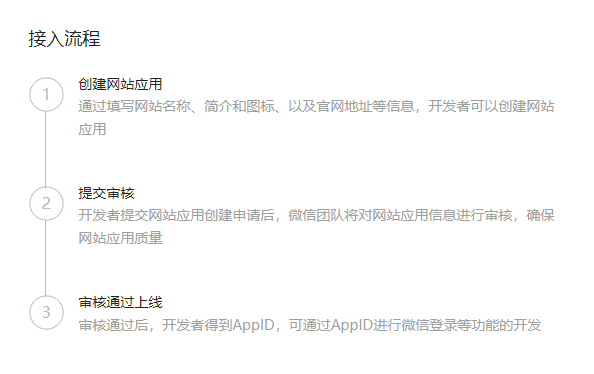
微信开放平台 注册并且创建应用,申请接入,成功后会获得 AppID 和 AppSecret
请求过程
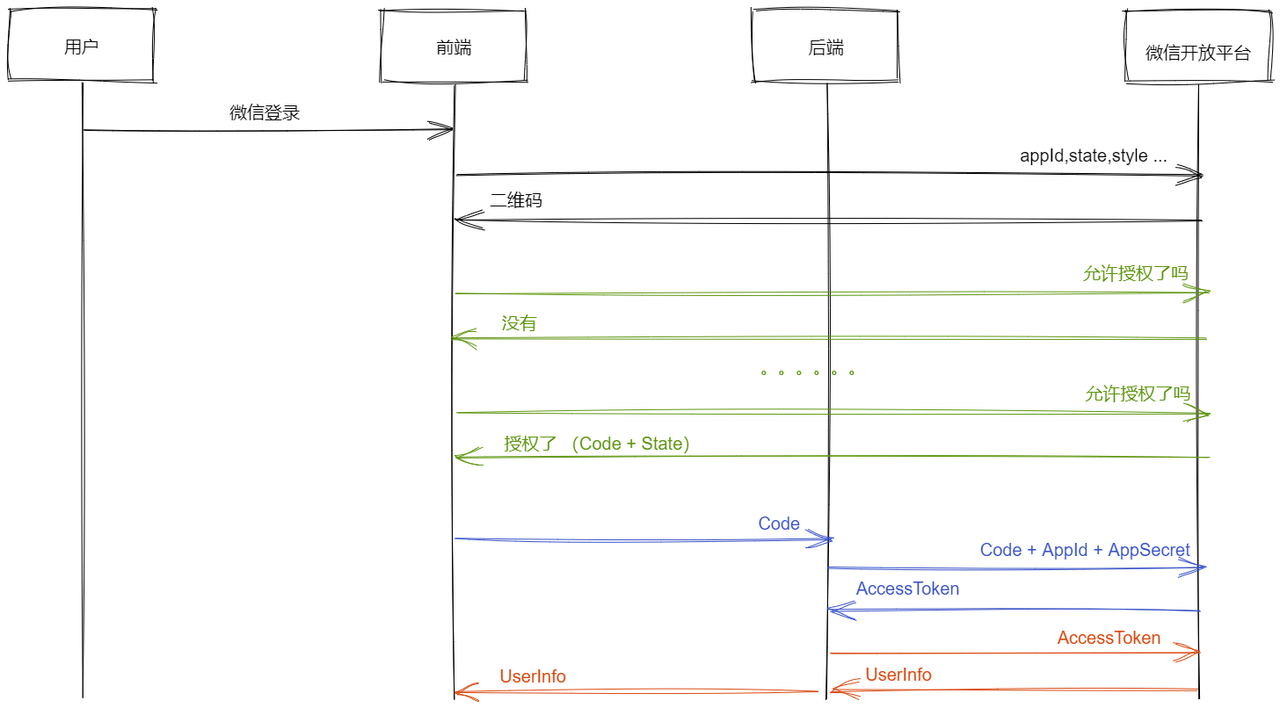
获取登录二维码
在页面中先引入如下 JS 文件(支持 https,可考虑使用 ahooks 的 useExternal)
http://res.wx.qq.com/connect/zh_CN/htmledition/js/wxLogin.js
该脚本主要做两件事:
- 请求二维码
- 发起长轮询
typescript
const obj = new WxLogin(wxLoginParam)  // new Window.WxLogin()

export interface WxLoginParam {
  id: string; // 第三方页面显示二维码的容器 id
  appid: string; // 应用唯一标识,在微信开放平台提交应用审核通过后获得
  redirect_uri: string; // 重定向地址,需要进行 UrlEncode,encodeURIComponent(url)
  self_redirect?: boolean; // 在 top window(false)/iframe(true) 跳转
  scope: string; // 应用授权作用域 ,'snsapi_login'
  state?: string; // 用于保持请求和回调的状态,授权请求后原样带回给第三方。
  style?: 'black' | 'white'; // 二维码样式
  href?: string; // 自定义二维码样式链接
}
请求 code
手机端扫描二维码后发生重定向至 redirect_uri,并且带上 code 和 state 参数
code(授权临时票据)用于获取 access_token,一个 code 只能成功换取一次 access_token 即失效
typescript
request({
   type: 'GET'
   url: 'https://open.weixin.qq.com/connect/qrconnect'
   param: CodeParam
})

type CodeParam = Pick<WxLoginParam, 'appid' | 'redirect_uri' | 'scope' | 'state'> & {
  response_type: 'code';
  lang?: 'cn' | 'en';
};
换取 access_token
使用 code 换取 access_token, 它可用于访问一些用户信息查询相关的接口
typescript
request({
   type: 'GET'
   url: 'https://api.weixin.qq.com/sns/oauth2/access_token' // 1w/min
   param: AccessTokenParam
})

interface AccessTokenParam {
  appid: string;
  secret: string; // 应用密钥 AppSecret
  code: string;
  grant_type: 'authorization_code';
}

export interface AccessTokenResponse {
  access_token: string; // 接口调用凭证
  expires_in: number; // 超时时间(秒)
  refresh_token: string; // 用于刷新 access_token
  openid: string; // 授权用户唯一标识
  scope: string; // 用户授权的作用域
  /**
   * @description 同一个微信开放平台帐号下的移动应用、网站应用和公众帐号,用户的 unionid 是唯一的
   * @description 用于不同应用中进行用户信息互通
  */
  unionid: string;
}

const AccessTokenError = { errcode: 40029, errmsg: 'invalid code' };
获取用户基本信息
使用 access_token 查询用户信息
typescript
request({
   type: 'GET'
   url: 'https://api.weixin.qq.com/sns/userinfo' // 5w/min
   param: AccessTokenParam
})

interface UserInfoParam {
  access_token: string,
  openid: string,
  lang: 'en' | 'zh_CN' | 'zh_TW' = 'en'
}

export interface UserInfo {
  openid: string;
  nickname: string;
  sex: 1 | 2; // 1 为男性, 2 为女性
  province: string;
  city: string;
  country: string;
  /**
   * @description 用户头像
   * @description 最后一个数值代表正方形头像大小(有0、46、64、96、132数值可选,0代表640*640 正方形头像)
   * @description 用户没有头像时该项为空,修改微信头像后该 url 会失效
   * @example https://thirdwx.qlogo.cn/mmopen/g3MHkdmze/0
   */
  headimgurl: string;
  privilege: string;
  unionid: string;
}
续期 access_token
出于安全性考虑, access_token 有效期较短
当 access_token 超时后,可以使用 refresh_token 进行刷新,如果已超时会得到一个新的,未超时则续期
typescript
request({
   type: 'GET'
   url: 'https://api.weixin.qq.com/sns/oauth2/refresh_token' // 5w/min
   param: RefreshTokenParam
})

interface RefreshTokenParam {
  appid: string;
  grant_type: 'refresh_token';
  refresh_token: string;
}

type RefreshTokenResponse = Omit<AccessTokenResponse, 'unionid'>;

const RefreshTokenError = { errcode: 40030, errmsg: 'invalid refresh_token' };
组件封装
typescript
const WechatQRCodeContainerId = 'WECHAT_QR_CODE_CONTAINER';

const WxExternalURL = '//res.wx.qq.com/connect/zh_CN/htmledition/js/wxLogin.js';

const BaseWxLoginConfig = {
  lang: 'cn',
  style: 'black',
  response_type: 'code',
  scope: 'snsapi_login',
  self_redirect: true,
  id: WechatQRCodeContainerId,
  state: Math.round(Math.random() * 10000),
};

interface WechatQRCodeProps {
  appId: string;
  onSuccess: (code: string) => void;
  host: string;
  width?: number;
  height?: number;
  redirectPath?: string;
}
export default function WechatQRCode({
  onSuccess,
  appId,
  host,
  width = 300,
  height = 400,
  redirectPath = '/redirect',
}: WechatQRCodeProps) {
  const status = useExternal(WxExternalURL, { js: { async: true } });

  const handleSuccess = usePersistFn(onSuccess);

  useEffect(() => {
    if (status === 'ready' && host && appId) {
      // @ts-ignore
      // eslint-disable-next-line no-new
      new WxLogin({
        ...BaseWxLoginConfig,
        appid: appId,
        href: DefaultStyle,
        redirect_uri: encodeURIComponent(`${document.location.protocol}//${host}${redirectPath}`),
      });
      const container = document.getElementById(WechatQRCodeContainerId);
      const iframe = container?.children[0] as HTMLIFrameElement;
      iframe.width = String(width);
      iframe.height = String(height);
      iframe.onload = () => {
        // 本地会出现跨域问题
        const doc = iframe.contentDocument;
        if (!doc) {
          return;
        }
        const param = new URLSearchParams(doc.location.search);
        const code = param.get('code');
        if (code) {
          handleSuccess(code);
        }
      };
    }
  }, [appId, handleSuccess, height, host, redirectPath, status, width]);

  return <div className={styles.qrCode} id={WechatQRCodeContainerId} />;
}
Tips
AppSecret,access_token,refresh_token是应用接口使用密钥,泄漏后将可能导致应用数据泄漏、应用的用户数据泄漏等高风险后果,存储在客户端,极有可能被恶意窃取state可用于防止csrf攻击,建议第三方带上该参数,可设置为简单的随机数加 session 进行校验scope(授权作用域) 代表用户授权给第三方的接口权限,网页应用目前仅填写snsapi_logincode的超时时间为 10 分钟,access_token有效期为 2 个小时,refresh_token有效期 30 天- 本地调试会有跨域的问题,会比较麻烦