
Husky
背景是开发组件库的过程中,想使用 husky 配置 git hooks 以实现在 git push 时自动执行单元测试
保障每次提交后组件功能均正常 work,因此在组件库中引入了 husky,但是我们使用了 Gerrit 做代码版本管理
关于 Gerrit
它的工作流程如下图所示
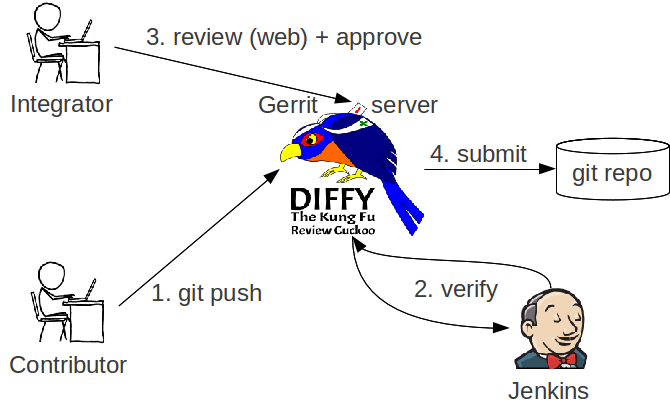
从 Gerrit 上拉取代码时会同时使用 scp 执行一个命令,在 git hooks 下生成一个 commit-msg 文件,可以在仓库的 .git/hooks 下看到
这个文件的作用是为每次 commit 生成一个 changeId,这个 changeId 对于 Gerrit 来说非常重要
如果没有这个 changeId,是没有办法 push 到远程分支的
问题
在安装了 husky 后发现每次 commit 时无法自动生成 changeId 了,以至于 push 失败
原因
经查证发现时 husky install 时改变了 githooks 文件的目录,可以发现 git config core.hooksPath 从之前的 .git/hooks 变成了 .husky
这就导致了上述的 commit-msg 不再执行,因此也无法生成 changeId
解决思路
方案一
将 commit-msg 需要执行的逻辑移动到 .husky 目录下
但是这样的复制无法预防之后 commit-msg 发生变动后带来的问题,所以感觉并不是最好的方案
根本原因还是 husky 直接改了 git 的配置
方案二👍
发现了另一个更轻量级 hooks 工具 simple-git-hooks ⭐1.4k
它具备几个特点:
零依赖
只需要在 package.json 内简单配置即可
轻量级
Package Unpacked size With deps husky v4 4.3.853.5 kB~1 mBhusky v8 8.0.36.44 kB6.44 kBpre-commit 1.2.2~80 kB~850 kBsimple-git-hooks 2.11.010.9 kB10.9 kB
并且不会像 husky 直接修改 git 的配置,使用方式也非常简单
安装
npm install simple-git-hooks --save-devjson 配置
在 package.json 内配置
"scripts": {
  // 每次 npm install 时执行
  "postinstall": "simple-git-hooks"
},

"simple-git-hooks": {
  "pre-commit": "npx lint-staged",
  "pre-push": "cd ../../ && npm run format",

  // All unused hooks will be removed automatically by default
  // but you can use the `preserveUnused` option like following to prevent this behavior

  // if you'd prefer preserve all unused hooks
  "preserveUnused": true,

  // if you'd prefer preserve specific unused hooks
  "preserveUnused": ["**commit-msg**"]
}
配置文件
除了在 package.json 内直接配置,你也可以像 eslint 那样使用配置文件
// .simple-git-hooks.js
module.exports = {
  "pre-commit": "npx lint-staged",
  "pre-push": "npm run format",
};
手动执行
可以手动执行来更新 .git/hooks
npx simple-git-hooks